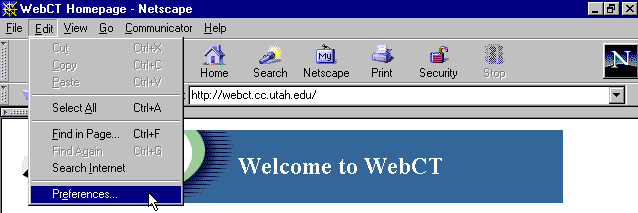
If you are running Netscape, here are instructions on how to enable JAVA.
Step 1: In your Navigator window, open the Edit menu and choose Preferences...
Step 2: In the Preferences window, select Advanced in the Category menu tree.
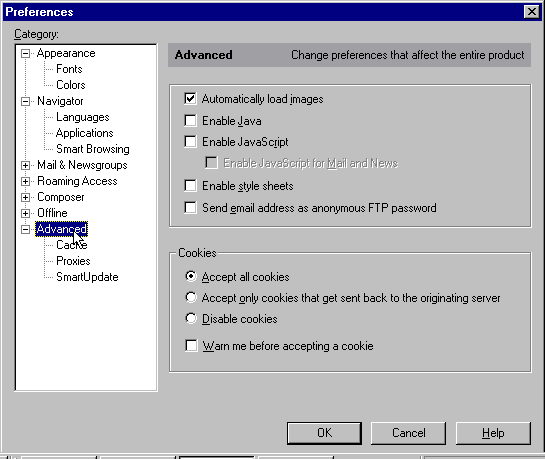
Step 3: Check Enable Java and Enable JavaScript in the Advanced preferences.
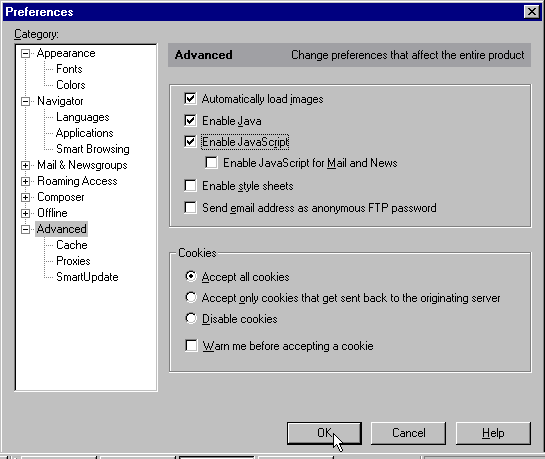
Step 4: Click OK. You might have to exit Netscape and restart it before the new settings take effect. It is also a good idea to check Automatically load images if your connection is fast enough for this feature, and accept all cookies, as WebCT uses cookies to remember who you are, hence you won't need to enter your login name and password every time you visit the course site in a single session.