Exercise 4-3 Coal washing jig
In this exercise you will learn how to enter coal washability data into MODSIM and investigate the modeling of coal washing jigs. You will use the equilibrium stratification model for the jig. The washability data for the coal is given in Table I.
Start a new job in MODSIM. Place a single Batac jig on the flowsheet. Draw a feed stream and clean coal and discard streams. Accept the flowsheet.
Edit the system data. Select coal processing plant but do not check proximate analysis becaause this is not available in this case. Specify specific gravity by particle type because washability data is available and the density of each washability fraction will be known. Set the number of size classes to 1 since washability is not available at different sizes in this example. Set largest particle size to 0.02 m. Specify 10 washability classes.
Double click on the feed stream, name the feed stream, clear the default size distribution data. Now specify the washability data. The data from Table I can be transcribed into the washability form. This is straightforward. Check all boxes that apply to the data. Only calorific value in the present case. It is necessary to specify the average density of each washability fraction. This is usually specified as the average density in washability classes 2 to 9. In the two extreme classes the average density is obtained by extrapolation assuming a linear relationship between the ash content and the reciprocal of the average density. Thus washability class I is assigned an average density of 1.295 and washability class 10 an average density of 2.336.
Finally make sure that the correct units for calorific value are specified.
Accept this data, edit the unit parameters and run the simulation. To see the stratification profiles in the jig, right click on the jig icon.
| Density | Class density | Weight % | Ash % | Calorific value MJ/kg |
| Float -1.30 | 1.295 | 35.1 | 1.84 | 35.2 |
| 1.30 - 1.35 | 1.325 | 28.3 | 4.85 | 34.1 |
| 1.35 - 1.40 | 1.375 | 15.4 | 9.78 | 32.1 |
| 1.40 - 1.45 | 1.425 | 4.5 | 15.21 | 30.0 |
| 1.45 - 1.50 | 1.475 | 2.0 | 19.48 | 27.6 |
| 1.50 - 1.60 | 1.550 | 1.5 | 26.58 | 25.2 |
| 1.60 - 1.70 | 1.650 | 2.1 | 35.20 | 21.7 |
| 1.70 - 1.80 | 1.750 | 3.2 | 41.02 | 16.4 |
| 1.80 - 2.20 | 2.000 | 3.8 | 56.8 | 11.2 |
| 2.20 Sink | 2.336 | 4.1 | 72.8 | 5.2 |
Table 1 Washability data for coal.
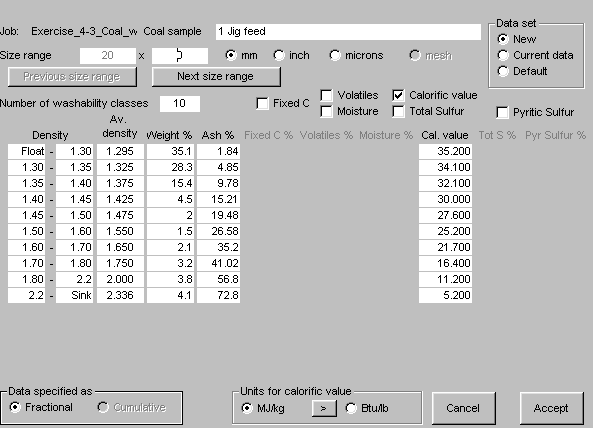
Washability data in MODSIM BACK
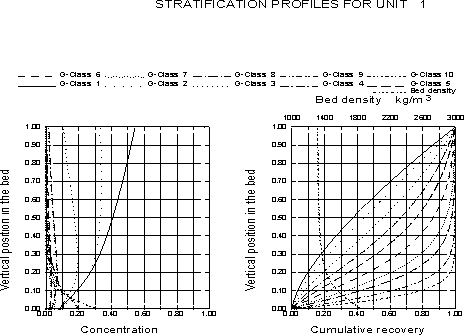
These profiles are accessible from the View Flowsheet menu and right clicking on the jig icon. These profiles are described in Technical Notes 7: Autogenous-media Separators.