Exercise 4-4 The Model for the Reichert Cone
This exercise will allow you to investigate the model for the Reichert cone. These interesting devices can be installed in any one of many different configurations. You should take some time to investigate these configurations which are described in Section 7.3.5 of the textbook and in Technical Notes 7 Section 7.1.4: A Model for the Pinched Sluice and Reichert Cone.
Start a new MODSIM job.
Select a Reichert cone from the gravity separation group in the select menu. Add a feed stream, a concentrate stream, a tailing stream and a middling stream.
The cone will treat 60 tonnes/hr of iron ore at 60% solids. The feed material has the following specifications:
Minerals: Magnetite specific gravity 5.2 and silica specific gravity 2.7
Table 1 Size distribution in the feed
|
|
|
|
|
|
|
|
|
|
|
|
|
|
|
|
|
|
|
|
|
|
|
|
|
|
|
|
|
|
Table 2 Liberation data for the iron ore. Distribution by mass in 3 size ranges.
| G-class | Fraction | % magnetite | 0x1.07 mm | 1.07x2.15 mm | >2.15 mm |
|
|
Float 2.7 |
|
|
|
|
|
|
2.7x3.17 |
|
|
|
|
|
|
3.17x3.94 |
|
|
|
|
|
|
3.94x5.2 |
|
|
|
|
|
|
Sink 5.2 |
|
|
|
|
Edit the system data to specify the feed material. Specify 2 minerals: Silica and magnetite. Specify the specific gravity by mineral.
Specify 10 size classes, 5 grade classes and largest particle size = 0.005 m.
Click "Set up grade classes" to specify the composition of the 5 types of particles. The default compositions must be changed to reflect the magnetite compositions of the 5 particles types as shown in Table 2. The specific gravities of the particle types will be calculated automatically.
Double click the feed stream in the system data form. Specify a name for the stream and enter the particle size distribution from Table 1. Specify a feed rate of 60 tonnes/hr at 60% solids.
Click on "Specify the grade distribution" to specify the distributions over the grade classes. Note that the distribution varies with particle size and data for 3 size ranges is given in Table 2. Change the upper size of the size range to 0.00107 (1.07mm) and press enter. A second size range is automatically created. Create the third size range by changing the upper size of the second size range to 0.00215. A new size range is automatically created. Select the size ranges in turn and enter the distributions over the grade-classes as specified in Table II. The data sheet should now look like this.
Edit the model parameter data for the Reichert cone. The model is quite versatile and any of the standard cone configurations can be simulated. For this exercise the 4DSV configuration is suggested. Note that because a middling stream has been drawn on the flow sheet, the cone configurations that do not permit the withdrawal of a middling stream cannot be selected. If you need more information on the various cone configurations consult section 7.1.4 of the Technical Notes.
For the first run of this model set the slots at value 5 for each stage. This means that each stage slot is set at the mid point of the available range. Choose the number of stage concentrates that make up the middling stream. From Table 7.3 in the Technical Notes select the coordinates of the point of convergence as (-31.0. 2.5). The specific stratification constant = 0.002 which is a typical value for the Reichert cone. The completed data form is shown here. This completes the data specification for this exercise. Accept the data and run the simulation.
The iron content of each of the process streams would normally be of interest in an operation such as this. The iron content can be displayed in the stream flyouts on the flow sheet and this needs to be set up in the output format. Edit the output format. Choose Fe as the metal and specify the Fe content of the two minerals that are present (0% in silica and 72.4% in magnetite).
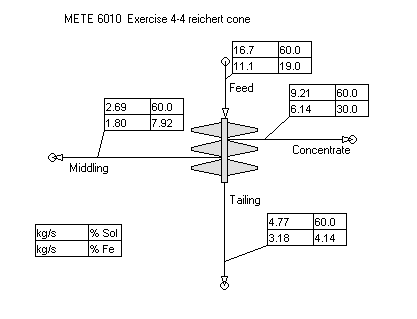
A typical output is shown here and you can immediately assess the effectiveness of the Reichert cone for this type of application.
You should now investigate the many possible variations that are available for this versatile piece of equipment. You should investigate the effect of using the different slot settings and also the effect of allocating concentrate streams between the concentrate and middlings. An interesting exercise is the investigation of the change in performance as the middling stream is recycled to the head of the unit.

Form to specify the distribution of particles over the G-classes in the 0x1.07 mm size range.

Form to specify the operating parameters for the Reichert cone. A 4DSV configuration has been chosen here.
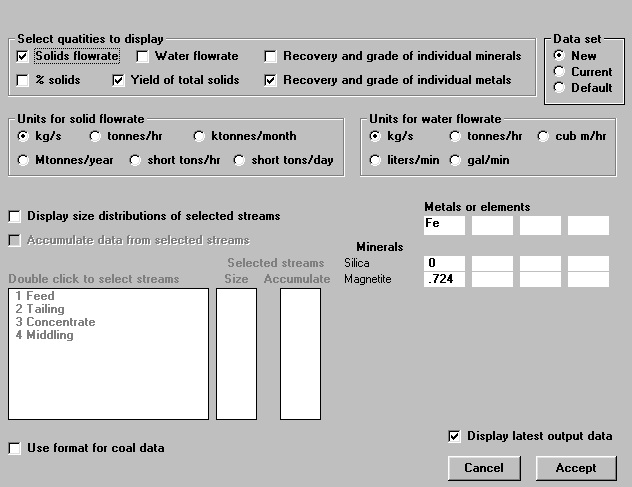
Set up the output format using this form. Note that "Recovery and grade of separate metals" is checked which generates the data for the fourth quadrant in the stream flyouts.
 TOP
TOP